
You've done the right thing. You've written blog posts. Maybe 10, maybe 20. You carved out time between client sessions, sat down, picked a topic, and published something. Consistently, or at least as consistently as a one-person business allows.
But now comes the uncomfortable question: is any of it working?
You check your website analytics and see a line going up, or sideways, or nowhere. There's some traffic. But you can't tell which posts are bringing people in and which ones are just sitting there. You don't know if the article you spent three hours writing last month has been read by 500 people or 5. And you definitely don't know whether Google is showing any of your pages when someone searches for the thing you wrote about.
So you keep writing and hope for the best. Or you stop writing because you can't see the point. Both are reasonable reactions when you have no visibility into what's happening.

The good news: getting that visibility doesn't require becoming an analytics expert. It takes one number per page and the ability to sort that number into three simple categories.
What "tracking your rankings" actually means
Strip away all the complexity, and rank tracking is this: for each page on your website, what position does Google put you in when someone searches for your target topic?
That's it. One number per page.
Position 3 means you're the third result on Google. People see you near the top — they click. Position 14 means you're on page 2. Almost nobody scrolls there. Position 47 means you're buried so deep you might as well not exist for that search. And a dash — no position at all — means Google hasn't connected your page to that search term yet.
You pick the search term you want each page to rank for (usually the question or topic the page answers), and then you watch where Google puts you. The number goes up, down, or stays the same.
That's rank tracking. No algorithms to understand. No certification needed. Just a number and a direction.
Three buckets — the only framework you need
Once you can see your rank for each page, every piece of content on your site falls into one of three categories:
Bucket 1: Climbing (positions 1-7). These pages are working. Google likes them, people are finding them, traffic is flowing. Leave them alone. Don't rewrite them, don't "optimize" them, don't touch them unless the rank starts slipping. The best thing you can do for a performing page is nothing.
Bucket 2: Close but stuck (positions 8-20). This is where your attention pays off most. These pages are good enough for Google to rank them, but not good enough to crack the first page (or the top of it). A stuck page often needs one thing: a missing section, a better answer to the main question, links from your other pages pointing to it, or more depth on a subtopic the top results cover and you don't. Small improvements here can push a page from invisible to visible.
Bucket 3: Not ranking (position 30+ or no position). These pages either need significant work, are targeting a search term that's too competitive, or are too new for Google to have evaluated them yet. Don't panic — new pages can take weeks to settle into a position. But if a page has been live for months and still isn't showing up, it's worth asking whether it's answering the right question.
You don't need to understand how search engines work to act on these three buckets. Climbing: leave it. Close: improve it. Not ranking: investigate it. That's the whole system.

What to do when a page is stuck
When a page is ranking in that 8-20 range and you want to push it higher, here's what to check — no jargon required:
Read the top results for the same search. Google what your page is trying to rank for and look at the pages in positions 1-3. What do they cover that you don't? Is there a section they all include that you're missing? If the top three results all explain "how to choose the right option" and your article skips that, adding it could be the difference.
Check whether your page actually answers the question. Sometimes articles drift from the topic. If someone searches "how to set coaching rates" and your article spends half its length on the history of the coaching industry, Google notices that you're not really answering the question.
Link to it from your other pages. If you have other blog posts that mention the topic, add a link pointing to the stuck page. This helps Google understand that the page is important to your site and gives readers a path to find it.
Add something only you can add. A specific example from your practice, a real scenario you've encountered, a direct opinion on a common misconception. This kind of content is what generic articles lack, and it's what Google increasingly rewards.
These aren't technical tasks. They're editorial decisions that you're well-qualified to make because you understand your topic better than anyone writing about it.
Stop guessing, start checking
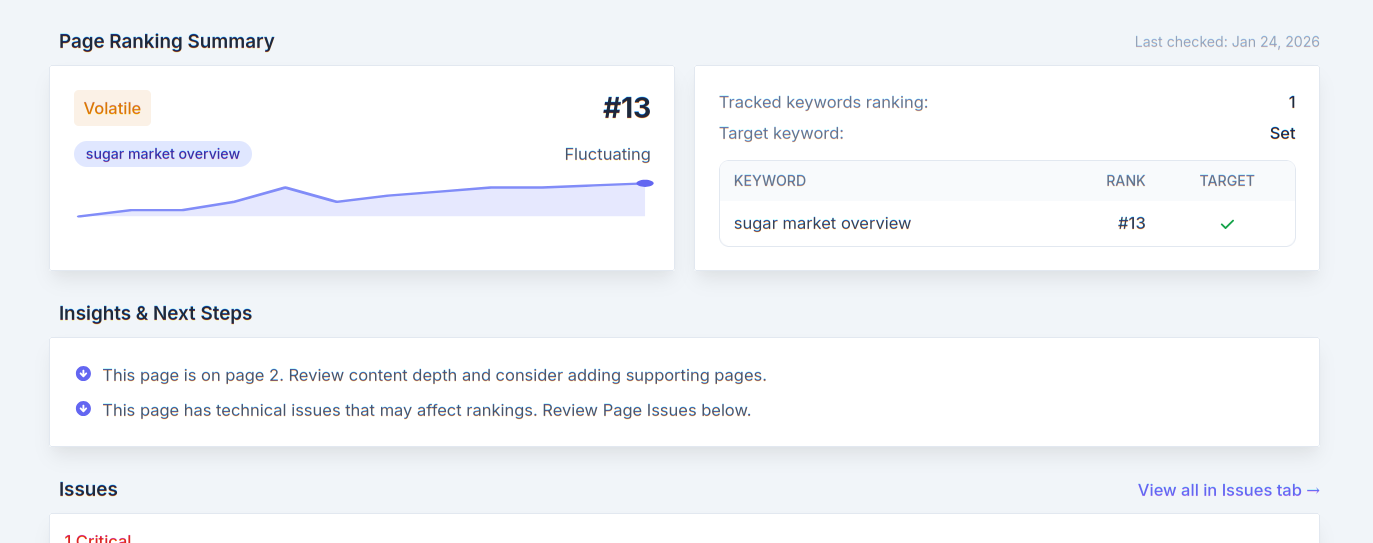
SitePerfector's rank tracking shows each of your pages in a clean table: the page name, the keyword it's targeting, its Google position, and its status. No dashboards filled with graphs you don't understand. No twenty-column spreadsheets. Just the information you need to sort your content into those three buckets and decide where to focus.
When a page needs improvement, the tool tells you what to fix — specific suggestions based on what's actually ranking above you, not generic tips from a checklist.
You don't need to become an SEO analyst. You don't need to learn what "keyword difficulty" means or interpret crawl reports. You just need to see which of your pages are working, which are close, and which need help — then act on the ones that matter.
The content you've already written is either building your business or sitting idle. The only difference between those two outcomes is knowing which is which.