
You've read the advice. "Do keyword research before you write." "Target the right search terms." "Build a content strategy around keywords."
Great. But you're a coach. Or a consultant. Or a therapist. You have clients to serve, a business to run, and maybe two hours a week — on a good week — to create content. You don't have time to learn keyword research. You need to know what to write about, and you need to know fast.
Here's the problem: most keyword research advice was written for people whose full-time job is SEO. It assumes you'll spend an afternoon in a spreadsheet, sorting hundreds of keywords by metrics you've never heard of. That's not your world. Your world is: I have Tuesday morning free, what should I write about?
This article is for that version of keyword research — the one that fits into a real business schedule.

The real cost of skipping keyword research
Let's be honest about what happens when you pick topics based on gut feeling alone.
You write a post about something you know well. It's good content — genuinely helpful. You publish it. A week goes by. A month. Barely anyone finds it through search.
The issue usually isn't quality. It's one of two things: either nobody is searching for that specific topic the way you framed it, or so many established sites already cover it that yours doesn't stand a chance of showing up.
Both of those problems are solvable — but only if you check before you write. That's all keyword research really is. Before you spend your limited writing time on a topic, confirm that people are actually searching for it and that your site has a realistic shot at ranking.
The solopreneurs who build consistent organic traffic aren't better writers. They just pick better topics.
What actually matters: fit and opportunity
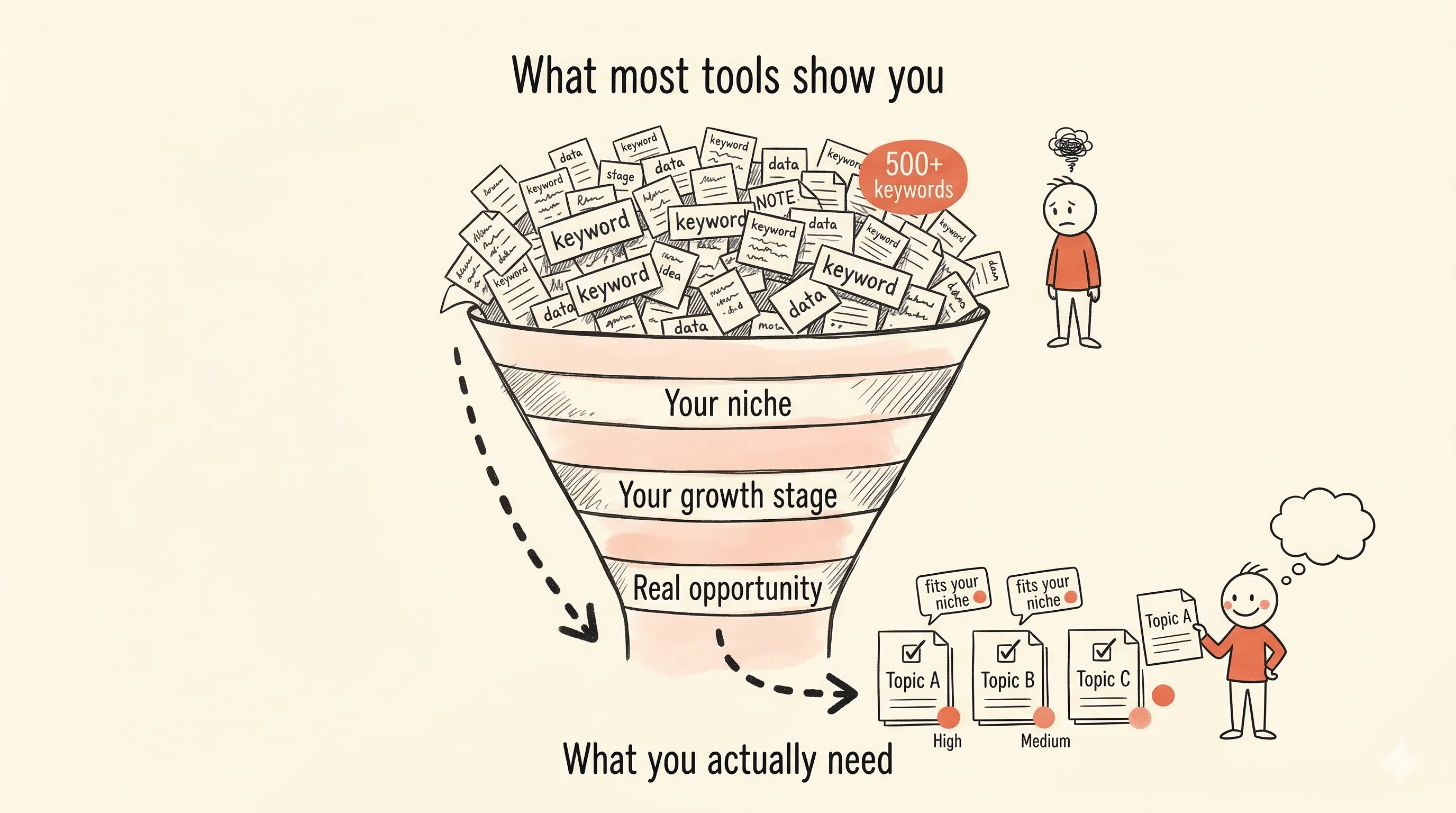
Forget everything you've heard about keyword difficulty scores, search volume ranges, and cost-per-click data. If you're running a coaching or consulting business and writing content to attract clients, you need to answer exactly two questions about any potential topic:
Does it fit what I do? If you're a career coach, "how to negotiate a raise" fits. "Best office chairs for back pain" doesn't — even if it gets tons of searches. Relevance to your actual expertise and services is the first filter.
Is it a realistic opportunity for my site? Some topics are dominated by massive sites that have been publishing about them for years. A brand-new coaching blog writing about "how to write a resume" is competing against Indeed, LinkedIn, and hundreds of established career sites. That's not a good use of your Tuesday morning. But "how to explain a career gap in a coaching industry interview" might be wide open.
That's it. Fit and opportunity. Every other metric is a more complicated way of getting at those same two answers. And if a tool can give you those answers directly, you don't need the complicated version.
Why your site's growth stage changes everything
This is something most keyword advice skips entirely: where your site is right now matters as much as the keyword itself.
Imagine you just launched your coaching website last month. You have five pages — home, about, services, contact, and maybe one blog post. Google barely knows you exist. At this stage, you need topics that are specific enough that bigger sites haven't bothered to cover them. Niche, long-tail topics where being the most relevant, helpful answer can actually win you a spot on the first page.
Now imagine you've been publishing consistently for a year. You have thirty posts, some of them ranking on page two or three. Your site has earned some credibility with Google. At this stage, you can start going after slightly broader topics. You've built a foundation.
The right keyword for stage one is wrong for stage two, and vice versa. A tool that doesn't account for this is giving you suggestions that look good on paper but waste your time in practice.

What useful keyword suggestions actually look like
Here's what happens when you open most keyword tools: you type in a topic, and the screen fills with a table. Hundreds of rows. Each keyword has five to ten numbers next to it — volume, difficulty, CPC, trend lines, competition scores. You don't know what most of them mean. You sort by one column, then another, then give up and pick something that looks reasonable.
Now imagine a different experience. You enter your website and describe what your business is about. The tool analyzes your site, looks at real search data, and comes back with a short list of keyword suggestions. Each one has two clear signals: does this fit your site's topic, and is it a good opportunity at your current growth stage.
That's how SitePerfector's keyword suggestions work. No spreadsheet. No difficulty scores to interpret. No guessing what the numbers mean. Each keyword is marked as fitting or not fitting your niche, and rated as a good or not good opportunity. You scan the list, pick the ones that resonate with your expertise, and move on.
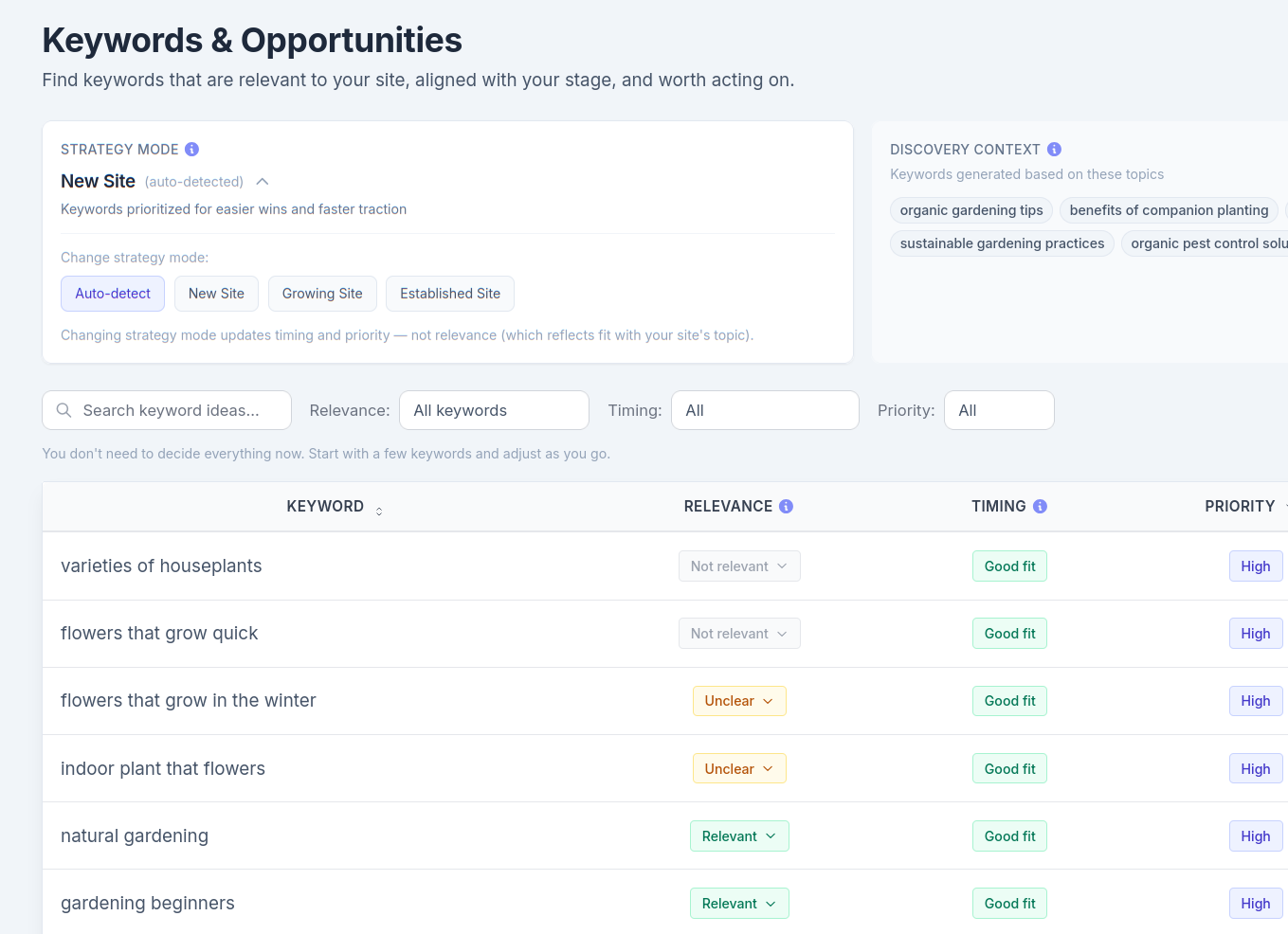
The filtering happens before you see the list. Irrelevant topics, keywords that don't match your niche, opportunities you can't realistically compete for — they're already removed. What you see is what's actually worth considering.
For someone with two hours a week, that difference matters. You're not spending an hour sorting and filtering. You're spending five minutes choosing from a list that's already been curated for your specific situation.
From keyword to content in one move
Here's where most workflows fall apart. You find a keyword in one tool, copy it, open a document, paste it as a working title, then try to remember what you were going to say about it. By the time you sit down to write — maybe days later — the momentum is gone.
A better system lets you go from "this is a good keyword" to "I'm planning this article" without switching tools or losing context. The keyword becomes a planned piece of content in your pipeline, ready for you when you have time to outline and write.
That's the goal: reduce the number of decisions between finding a topic and actually creating content about it. Every extra step, every tool switch, every copy-paste is a place where a busy person drops off. One system that handles the whole flow — from keyword to pipeline to published article — means your Tuesday morning actually produces something.
You don't need to become an SEO expert
The content game for solopreneurs is simpler than the SEO industry makes it sound. Find topics your potential clients are searching for. Make sure your site can realistically rank for them. Write helpful content from your actual expertise. Repeat.
You don't need to interpret keyword difficulty scores or understand search volume trends. You need a system that does that interpretation for you and presents the result in plain language: this fits, this is worth it — write this one.
That's the approach SitePerfector was built around. Not another dashboard full of numbers, but a curated list of suggestions matched to your niche and your site's current stage. So you can spend your limited time on what you're actually good at: creating content that helps your clients.