
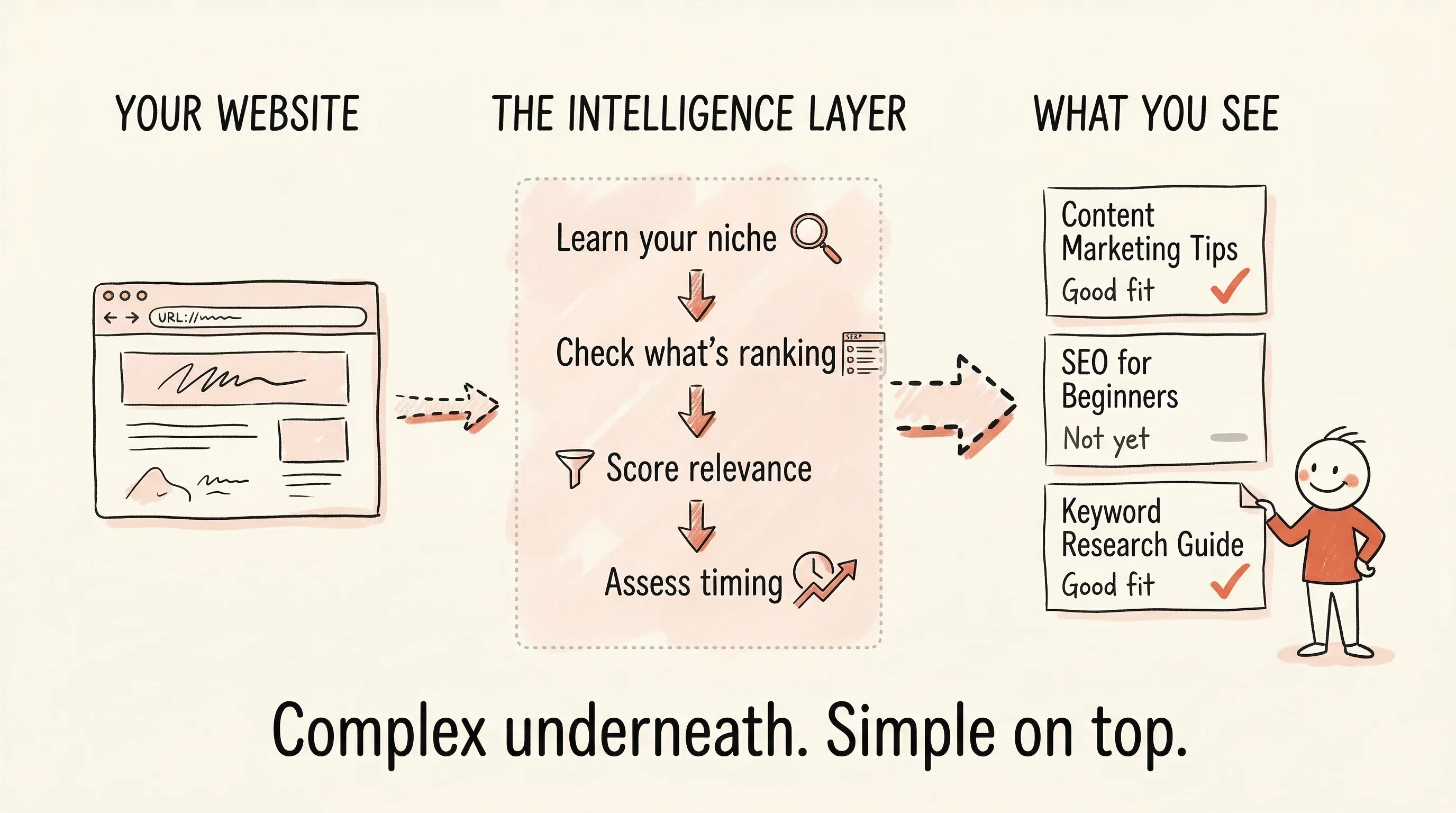
You add your website to SitePerfector. A few minutes later, you see a short list of keyword suggestions — each labeled with whether it fits your site and whether it's worth pursuing.
It looks simple. Two columns. Clean answers.
But between your website URL and that list, a lot happened. Understanding what happened is the difference between thinking "this tool seems basic" and thinking "this tool did the work I would have needed three tools and a weekend to do myself."
The intelligence layer
Most keyword tools work in one direction: you type a seed keyword, the tool queries a database, and you get back a list of related terms with metrics attached. The thinking is left to you.
SitePerfector works differently. Before you ever see a suggestion, the system runs a multi-step analysis that combines your site's actual content, real Google search data, and a scoring engine that weighs relevance, opportunity, and timing together.
It starts by learning your site
When you add your website, SitePerfector crawls it — not just to find pages, but to understand what the site is about.
The system reads your content, identifies your topics, maps the relationships between your pages, and builds a semantic profile. Think of it as the system learning your niche — not from a dropdown menu where you pick "Health & Fitness" or "Marketing," but from your actual published content.
This matters because everything that follows uses this understanding as a filter. A keyword suggestion that doesn't fit your site's topics never reaches you, no matter how high its search volume.
Then it checks what's actually ranking
For keywords that pass the relevance filter, the system looks at what's ranking in Google right now. Not just the URLs — the content.
What type of content ranks? Long guides? Short answers? Listicles? What topics do the top results cover? What's missing?
This is the same analysis an experienced SEO strategist would do manually — opening Google, reading the top 10 results, taking notes on what's working. SitePerfector does it systematically across every relevant keyword.
This SERP intelligence also feeds into outline generation later, which is why outlines feel grounded instead of generic — they're built from what Google is actually rewarding for that specific topic.
Two questions, answered automatically
Every keyword that passes the relevance filter gets evaluated on two axes:
Does this fit your site? Not a simple keyword-matching exercise — it's semantic relevance checking. Would a piece of content about this keyword feel natural alongside your existing content? A fitness coach's site might logically cover "recovery after a workout" but not "best protein powder brands." Both have search volume. Only one fits.
Is the timing right? A site with five published pages and no rankings is in a fundamentally different position than a site with 80 articles and strong traffic. The same keyword might be labeled "not right for you yet" when your site is new, and "good opportunity" six months later. The keyword didn't change. Your site did.
SitePerfector calculates your site's maturity from your actual ranking data — how many pages rank, at what positions, against how difficult keywords. It maps this maturity against each keyword's competitive landscape to produce a timing assessment that updates automatically as your site grows.
What you don't see (on purpose)
Under the hood, the system computes several indexes per keyword: traffic potential relative to your niche, commercial value (are searchers looking to buy or just browsing?), achievability given your site's current strength, and return on effort across all of these combined.
All of those numbers exist in the system. None are shown to you by default.
The reason is simple. Showing the calculations doesn't help you make better decisions. It makes you second-guess the decisions the system already made. You'd start Googling "what is a good achievability score" and end up right back where you started with traditional tools — staring at numbers you don't fully understand.
The simplicity on the surface is not the absence of intelligence. It's the result of it.
When you see "Good fit" next to a keyword, that label represents semantic relevance confirmed by AI analysis, adequate search volume for your niche, achievable difficulty for your site's current strength, favorable commercial intent, good timing for your growth stage, and strong return on effort compared to alternatives.
All in two words.
Why this approach works
With traditional tools, keyword research is a skill. You need to understand what the metrics mean, how to weigh them against each other, how to factor in your specific situation. That's reasonable if you're an SEO professional. It's a wall if you're a business owner, coach, or blogger who just wants to know what to write next.
SitePerfector moves the expertise into the system. The engine does the analysis that an experienced strategist would do — and presents the conclusion, not the working notes.
You can always see the raw data if you want it. But the default is the conclusion. And for most people, that's all they need to move forward with confidence.
The keyword list looks simple because the hard work already happened. That's the point.
See how this works in practice on the content strategy page.